
Download Slides Orator – Interactive AI Presentation Tool
Overview
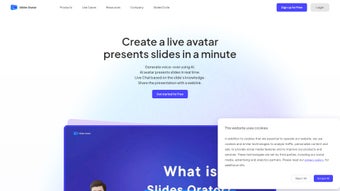
Slides Orator is a cloud‑native presentation platform that turns ordinary slide decks into lively, interactive experiences. By embedding a real‑time 3D AI avatar directly into the browser, the tool lets presenters speak, gesture, and answer audience questions without ever leaving the slide view. The avatar can be customized with a personal photo, corporate logo, or brand‑specific color palette, ensuring that every presentation feels uniquely yours.
Because the application runs on modern HTML5, WebGL, and JavaScript standards, there is no need to download bulky installers; a simple URL opens the full‑featured environment on any device that supports Chrome, Edge, Firefox, or Safari. This design philosophy keeps the software lightweight, reduces IT overhead, and guarantees that updates and security patches are applied instantly from the server side. Whether you are delivering a corporate training session, a university lecture, or a product demo to investors, Slides Orator adds a conversational layer that keeps audiences engaged, encourages real‑time feedback, and even suggests fresh talking points on the fly.
The platform also offers built‑in analytics, end‑to‑end encryption, and multi‑language support, making it a secure, scalable solution for teams of any size. In short, Slides Orator bridges the gap between static content and dynamic interaction, helping you communicate ideas more effectively in today’s hybrid‑work environment.
Key Features & Getting Started
- Real‑time 3D AI Avatar – A lifelike digital presenter that can speak, gesture, and react to live chat.
- Interactive Chat Integration – Audience members type questions; the avatar replies with context‑aware answers.
- Idea Generation Engine – The AI suggests examples, data points, or alternative angles during Q&A.
- Custom Visual Identity – Upload photos, logos, and brand colors for a personalized avatar.
- Web‑Based, No‑Install Required – Works in any modern browser on Windows, macOS, Linux, Android, or iOS.
- Efficient Game‑Engine Rendering – Client‑side graphics deliver smooth animations while keeping server costs low.
- Live Slide Synchronization – Avatar highlights current slide content automatically.
- Secure Cloud Infrastructure – TLS‑encrypted chat, GDPR/CCPA compliance, and automatic data purging.
- Automatic Updates – New features and security patches are pushed without user intervention.
- Multi‑Language Support – Conversational ability in several major languages.
Getting started with Slides Orator is intentionally frictionless. Visit the official website, click “Start Free Trial,” and create an account using an email address or SSO (Google Workspace, Azure AD). After email verification, you land on a clean dashboard where you can either build a new presentation from scratch or import an existing PowerPoint or Google Slides file.
The import wizard converts each slide into a format the AI avatar can reference, preserving animations, charts, and embedded media. Once the slides are ready, navigate to the “Avatar Settings” panel to select a pre‑made character or upload a custom portrait. Adjust voice tone, speech speed, and language to match your audience’s expectations.
When you’re prepared to go live, click “Launch Live Session.” The platform instantly generates a shareable link that participants can open in any browser—no plug‑ins or downloads required. During the session, a simple toolbar lets you advance slides, while the avatar automatically cues the next slide, emphasizes key bullet points, and answers chat queries in real time. After the presentation, Slides Orator provides a detailed analytics report covering engagement metrics, most‑asked questions, and suggestions for future improvement.
This seamless workflow ensures that even users with limited technical expertise can deliver polished, interactive presentations in minutes.
Because Slides Orator adapts to the user’s operating system, the same URL delivers an optimized experience on Windows 10/11, macOS 12+, Linux distributions, Android 9+, and iOS 13+. The adaptive UI switches between mouse‑driven controls on desktops and touch‑friendly gestures on tablets and smartphones, guaranteeing a consistent, high‑quality experience regardless of device.
Pros, Cons & Frequently Asked Questions
Pros
- Engaging 3D AI avatar that personalizes the presentation.
- Real‑time chat and AI‑driven Q&A keep audiences actively involved.
- No installation needed; runs directly in the browser.
- Cross‑platform compatibility across Windows, macOS, Linux, Android, and iOS.
- Secure cloud infrastructure with automatic updates and GDPR compliance.
- Customizable avatar appearance and multilingual support.
- Post‑session analytics help refine future presentations.
Cons
- Requires a stable internet connection; low‑bandwidth environments may experience lag.
- Advanced avatar customization (custom 3D models) is limited to premium plans.
- AI humor or tone may not suit highly formal corporate settings.
- Initial learning curve for presenters new to AI‑assisted tools.
- Free tier caps session length and participant numbers.
Is there a free version of Slides Orator?
Yes. The free tier allows up to three live sessions per month with a maximum of 30 participants each. Paid plans start at $19.99 per month and unlock unlimited sessions, custom avatar models, priority support, and advanced analytics.
Can I use Slides Orator offline?
Full functionality requires an active internet connection because the AI processing and real‑time rendering happen in the cloud. However, you can prepare and edit slides offline; changes sync automatically once you reconnect.
How secure is the chat data during a presentation?
All chat messages are encrypted end‑to‑end with TLS 1.3. Data is stored only for the duration of the session and automatically purged after 48 hours, meeting GDPR and CCPA standards.
Can Slides Orator integrate with my LMS or CRM?
Yes. The platform offers RESTful APIs and webhooks that connect with popular Learning Management Systems (Moodle, Canvas) and CRM tools (Salesforce, HubSpot), enabling automated session scheduling, participant tracking, and data export.
Which browsers are officially supported?
Slides Orator is optimized for the latest versions of Chrome, Edge, Firefox, and Safari. While it may function on older browsers, performance and avatar rendering quality cannot be guaranteed.
Conclusion & Call to Action
Slides Orator redefines what a presentation can be by merging a responsive 3D AI avatar with live chat, idea generation, and robust analytics—all within a secure, browser‑based environment. The platform eliminates the need for heavy desktop installations, offers seamless cross‑device compatibility, and provides the flexibility to customize the avatar to match any brand identity. Whether you are a corporate trainer looking to boost learner engagement, an educator seeking interactive classroom tools, or a startup founder wanting to impress investors with dynamic storytelling, Slides Orator delivers the features and security required for modern communication.
The free tier lets you test the core capabilities, while premium plans scale to meet the demands of larger teams and more complex use cases. Ready to turn your next slide deck into a conversation‑driven experience? Download Slides Orator now and start your free trial today—experience the future of presentations where your slides talk, listen, and adapt in real time.



.png)



